

The 1win bet slip in short
Test passport
- Checked
- 8 Oct, 13 Oct and 14 Oct 2026; the latest on an iPhone with a Nigerian IP
- What we did
- Added selections to the betslip without an account and read its tabs
- What we did not do
- No deposit, withdrawal, document upload or bet made; the app was not installed
The short answer
- Selections can be added to the betslip without logging in.
- The slip has three tabs: Single, Multiple and Series.
- “MAX Possible win” shows the return if every selection wins.
- Placed bets belong in Bet history, a tab in the Sports menu.
- A booking-code field was not visible without an account.
Three different things are often called a “slip”: the betslip panel where a bet is built, the record of a placed bet, and a booking code that loads someone else’s selections. The first two exist on every sportsbook; the third depends on the bookmaker, and on 1win.ng it was not confirmed.
Terms in this entry
- Betslip
- The panel where selections, stake and bet type are set
- Bet history
- The account record of placed bets and their results
- Booking code
- A short code that reloads saved selections on the same bookmaker
- Ticket ID
- The number a bookmaker gives a placed bet
- Void
- A bet or leg cancelled and valued at 1.00
Checking the betslip before you bet
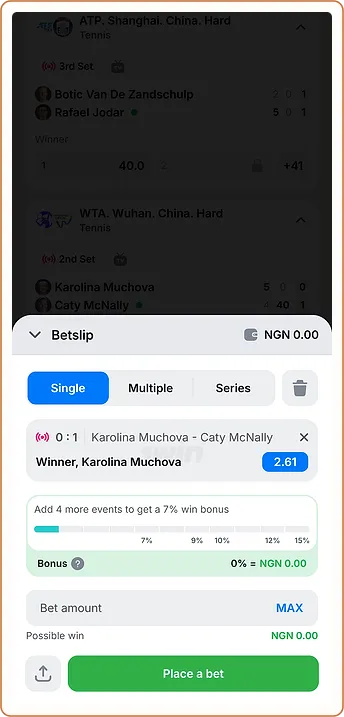
On 13.10 a tap on a price on 1win.ng added the selection to the betslip without asking for a login. The slip then showed three tabs, Single, Multiple and Series, along with a “Bonus” field, a “MAX Possible win” field and a “Place a bet” button. Pressing that button needs an account with a balance, and our checks stopped there. On 14.10 the slip looked the same, with a stake field added, and no cash-out or bet builder was found on the match page, in the rules or in the slip; the sports rules call the accumulator reward an “Express bonus”.
What to read on the slip
- The match and market of each selection, to catch a wrong tap on a neighbouring price.
- The tab: Single places separate bets, Multiple combines them, Series builds smaller combinations.
- The price beside each selection, which can change before the bet is accepted.
- “MAX Possible win”, the total paid if every selection wins.
The slip also displayed an accumulator win bonus. The line read “Add 4 more events to get a 7% win bonus”, with steps of 7% · 9% · 10% · 12% · 15%. The slip did not explain whether the bonus is calculated on profit or on the whole return, so that detail is not confirmed here.
How to check my bet slip on 1win after placing it

After a bet is placed, its record belongs in the account’s bet history. On 1win.ng the Sports menu showed a Bet history tab next to Top, Live, Upcoming, TOP Bets and Esports. Without an account the tab could not show any bets, so the columns, filters and status names inside it were not seen. On most sportsbooks the record lists the date, the selections, the price accepted, the stake and the status.
What a status means
- Pending: the bet is accepted and its events have not all finished.
- Won: every selection won; the return is credited to the balance.
- Lost: at least one selection lost.
- Void or returned: the bet was cancelled and the stake refunded.
Worked example
A void leg changes the price of a multiple rather than cancelling it. Here is a worked example. A double at 1.66 and 2.40 has combined odds of about 3.98, so ₦1,250 would return around ₦4,980. If the 2.40 match is postponed and that leg is voided at 1.00, the double pays as a single at 1.66: ₦1,250 × 1.66 = ₦2,075.
Booking codes and other people's slips
A booking code saves a set of selections so another person can load them on the same bookmaker. On 13.10 no field for entering a booking code was visible on 1win.ng without an account. Whether 1win.ng issues or accepts booking codes is therefore not confirmed. Moving a code between different bookmakers is a separate process, explained in the booking-code conversion guide.
A slip shared as a screenshot or code shows only the selections, never the account behind them. Nobody needs another person’s login to check their own bets, and a request for login details in exchange for a “winning slip” is a warning sign.
If a bet looks wrong
A bet missing from the history or settled unexpectedly is a matter for 1win support. The live chat opened with a bot offering topics that include “Casino and Sports”; how long a live agent took to join during our test is recorded in the 1win support entry. Useful details to send are the date and time, the match, the market, the stake and the status shown. Our check found no FAQ or help centre on 1win.ng, so the chat is the main route, with Telegram and WhatsApp also listed by the site.
What we could not confirm
| Item | What 1win.ng showed | Status |
|---|---|---|
| Betslip tabs and fields | Single, Multiple, Series; “Bonus”, “MAX Possible win”, “Place a bet” | Seen on site |
| Bet history | A tab in the Sports menu | Seen on site |
| Contents of Bet history | Not visible without an account | Not checked |
| Booking-code entry or sharing | Not visible without an account | Not checked |
| Minimum and maximum stake | Not in the sports rules on 14.10 | Not checked |
How to check bet slip on 1win in full, with ticket numbers and status names, needs an account and a placed bet; this entry will be updated if a later check covers them. The general rules for single, multiple and system bets are in the overview of bet types and the 1win sportsbook.
Claim the bonus on 1win.ng18+ · T&C Apply · operator named in the 1win.ng footer: BID Entertainment Limited
What changed on this page
- Entry rewritten for 1win-nigeria.ng from our checks of 1win.ng on 8, 13 and 14 October; every 1win figure is marked by source.
- Updated with the third check: deposit limits per method, withdrawal times from the rules, KYC rules, lobby and sportsbook counts.
Found a mistake? Write to [email protected] and we will date the fix here.
FAQ
Do I need an account to use the 1win betslip?
Not to build one. On 13.10 selections could be added without logging in, but placing the bet needs an account.
Where are my placed bets on 1win.ng?
In Bet history, which appeared as a tab in the Sports menu on 13.10. Its contents could not be viewed without an account.
What does "MAX Possible win" mean?
It is the total the slip would pay if every selection won, based on the stake and the prices on the slip.
Can I load a booking code on 1win.ng?
That was not confirmed. No booking-code field was visible without an account during our 13.10 check.
Can I check someone else's 1win bet slip?
Only what they share with you, such as a screenshot. Bet history belongs to the account that placed the bets.