
The full list of 1win payment methods
Test passport
- Checked
- 8 Oct, 13 Oct and 14 Oct 2026; the latest on an iPhone with a Nigerian IP
- What we did
- Listed the nine deposit methods, their limits and the withdrawal rules
- What we did not do
- No deposit, withdrawal, document upload or bet made; the app was not installed
The short answer
- Nine deposit entries, all in NGN, none for crypto.
- Six withdrawal methods, each matching a deposit provider.
- Each entry printed a ₦1,000 floor and its own ceiling.
- No fees appeared anywhere in the cashier.
The deposit list, in the order of the cashier, reads: Opay, Transfer Paystack, PalmPay, Paga, Pay with Bank Paystack, Nigerian cards (Visa, Mastercard, Verve), Pay by USSD Paystack, Bank Transfer Flutterwave and USSD Flutterwave. Three are standalone wallets, three are Paystack routes, two are Flutterwave routes, and one covers cards.
- Deposit entries
- 9, NGN only
- Wallet apps
- Opay, PalmPay, Paga
- Processor routes
- 3 via Paystack, 2 via Flutterwave
- Cards
- Visa, Mastercard, Verve (Nigerian)
- Limits per deposit
- ₦1,000 – ₦250,000; Flutterwave entries up to ₦500,000
- Payout methods listed
- 6
- Fees
- Not shown
Wallet entries: Opay, PalmPay and Paga
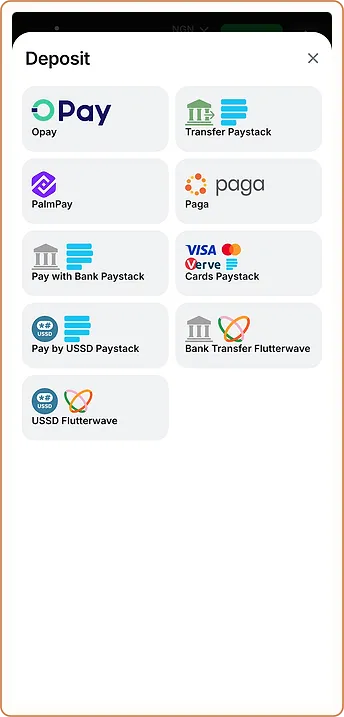
Opay, PalmPay and Paga are wallet apps with their own balances, so a payment through them moves money from the wallet balance rather than straight from a bank account. All three also appear on the withdrawal list, which makes each one a matching route for both directions. On 14.10 each of them printed a range of ₦1,000 – ₦250,000 per deposit.
Paystack and Flutterwave routes
Paystack and Flutterwave are payment processors that sit between a bank and the merchant. In the 1win cashier they carry five entries between them. The three Paystack entries share the ₦1,000 – ₦250,000 range, while the two Flutterwave entries accept up to ₦500,000 per deposit.
Bank transfer and pay-with-bank
Transfer Paystack and Bank Transfer Flutterwave are transfer routes; a processor of this kind normally issues payment details for the transfer. Pay with Bank Paystack is a separate entry that, as the name says, uses the bank account directly. We did not open the provider screens, so the exact prompts are not described.
USSD entries
Pay by USSD Paystack and USSD Flutterwave give a route for a phone without a banking app. A USSD session is run on the phone network and the bank, and any charge for it is set by the bank, not shown on 1win.ng.
Which reference to keep
A processor entry produces two records: the bank’s debit and the processor’s own transaction reference. If a payment through Paystack or Flutterwave goes missing, 1win support is likely to ask for the processor reference, while the bank needs its own debit record to trace or reverse it. Keeping both, with the amount and the time, covers either conversation. A wallet entry is simpler, because the wallet app holds the single record.
Reading an entry before you pay
Each cashier entry is a separate provider with its own screen, so three questions are worth answering on the entry itself, on the day: does the amount field show a minimum or maximum, does the provider display a charge before approval, and does the same provider appear on the payout list. Since 14.10 every entry answers the first question in print; the charge, if any, appears only inside the provider step, which we did not reach.
Nigerian cards and the card limit
Worked example
The card entry, shown as Cards Paystack, accepts Nigerian Visa, Mastercard and Verve cards. On 08.10 it was the only entry with a printed range and a higher ceiling; on 14.10 it showed ₦1,000 – ₦250,000, the same as the wallets. Here is a worked example. A player planning ₦640,000 of card deposits would need at least three payments, since ₦250,000 × 2 = ₦500,000 leaves ₦140,000 for a third; through a Flutterwave entry two payments would do.
Matching deposit and payout methods
The payout side lists Opay, Paystack, PalmPay, Paga, Visa (Nigerian cards) and Flutterwave. Every payout name matches a deposit provider, in a shorter form: the processors appear as “Paystack” and “Flutterwave”, not split into transfer and USSD.
One gap follows from that list. Mastercard and Verve are named for deposits, but the payout list names Visa only; whether a payout to a Mastercard or Verve card is possible was not shown. The order of the payout steps and the identity check that comes first are covered in the withdrawal walkthrough.
Payment agents and transfers to people
The nine entries contain no payment agent, and nothing on the cashier asked for a transfer to a private account. A request to send money to an individual “for 1win”, whether by message or in a chat group, did not come from any entry we saw. Paying such a person removes the record that the cashier entries provide.
Choosing a 1win payment method for your situation
A wallet user is best served by the wallet’s own entry, since the same wallet appears for payouts. A player without a banking app has the two USSD entries. A player who wants the largest single payment has the two Flutterwave entries. Deposit steps, the evidence to keep and the problem checklist are on the deposit reference page.
What we could not confirm
| Item | What 1win.ng showed | Status |
|---|---|---|
| Nine deposit entries | Listed in the NGN cashier | Seen on site |
| Six payout methods | Listed for withdrawals | Stated by site |
| Limits of each entry | ₦1,000 – ₦250,000 or ₦500,000 | Seen on site |
| Fees per entry | No figures | Not checked |
| Payouts to Mastercard or Verve | Not mentioned | Not checked |
Pros
- Wallets, transfer, USSD and cards in one naira list
- Every payout method matches a deposit provider
- A printed range on every entry
- No entry routes money through a private person
Cons
- No fees or timings shown for any entry
- ₦250,000 ceiling on seven of nine entries
- Card payouts are listed for Visa only
- No crypto in the naira cashier
Verdict on 1win payment methods
7.1/10
Our score · 1win.ng checked 8, 13 & 14 Oct 2026 · how we score
The 1win payment methods cover the main ways money moves in Nigeria, every payout method has a matching deposit provider, and each entry now prints its limits. The cashier is still thin on detail: fees and timings are missing, and card payouts name one network.
It suits players who already use Opay, PalmPay, Paga, a Paystack or Flutterwave route, or a Visa card.
Who should skip it: anyone who pays only by crypto, or who needs a fee table before choosing a route.
Claim the bonus on 1win.ng18+ · T&C Apply · operator named in the 1win.ng footer: BID Entertainment Limited
What changed on this page
- Entry rewritten for 1win-nigeria.ng from our checks of 1win.ng on 8, 13 and 14 October; every 1win figure is marked by source.
- Updated with the third check: deposit limits per method, withdrawal times from the rules, KYC rules, lobby and sportsbook counts.
Found a mistake? Write to [email protected] and we will date the fix here.
FAQ
Does 1win accept Verve cards in Nigeria?
Yes, for deposits: the card entry names Visa, Mastercard and Verve. The payout list names Visa only.
Can I pay into 1win with USSD?
Yes. The cashier has two USSD entries, one through Paystack and one through Flutterwave.
Which 1win payment works for both deposits and withdrawals?
Opay, PalmPay and Paga appear on both lists, as do Paystack and Flutterwave. Visa cards also appear on both.
Is there a 1win payment agent I can pay in cash?
No agent entry appeared in the cashier. Pay only through the listed entries, which leave a transaction record.
Are the payment methods the same in the 1win app?
The cashier inside the app was not opened in our checks. The list here comes from the mobile site.